
Record. Resolve. Prevent.
One health and safety platform. Built for UK law. Works without signal.
Report incidents, triage RIDDOR, run risk assessments, issue permits, check vehicles and track training. One app for the office and the frontline, hosted in the UK.
A 30-minute walkthrough on a UK haulier’s setup. No form to fill in first.
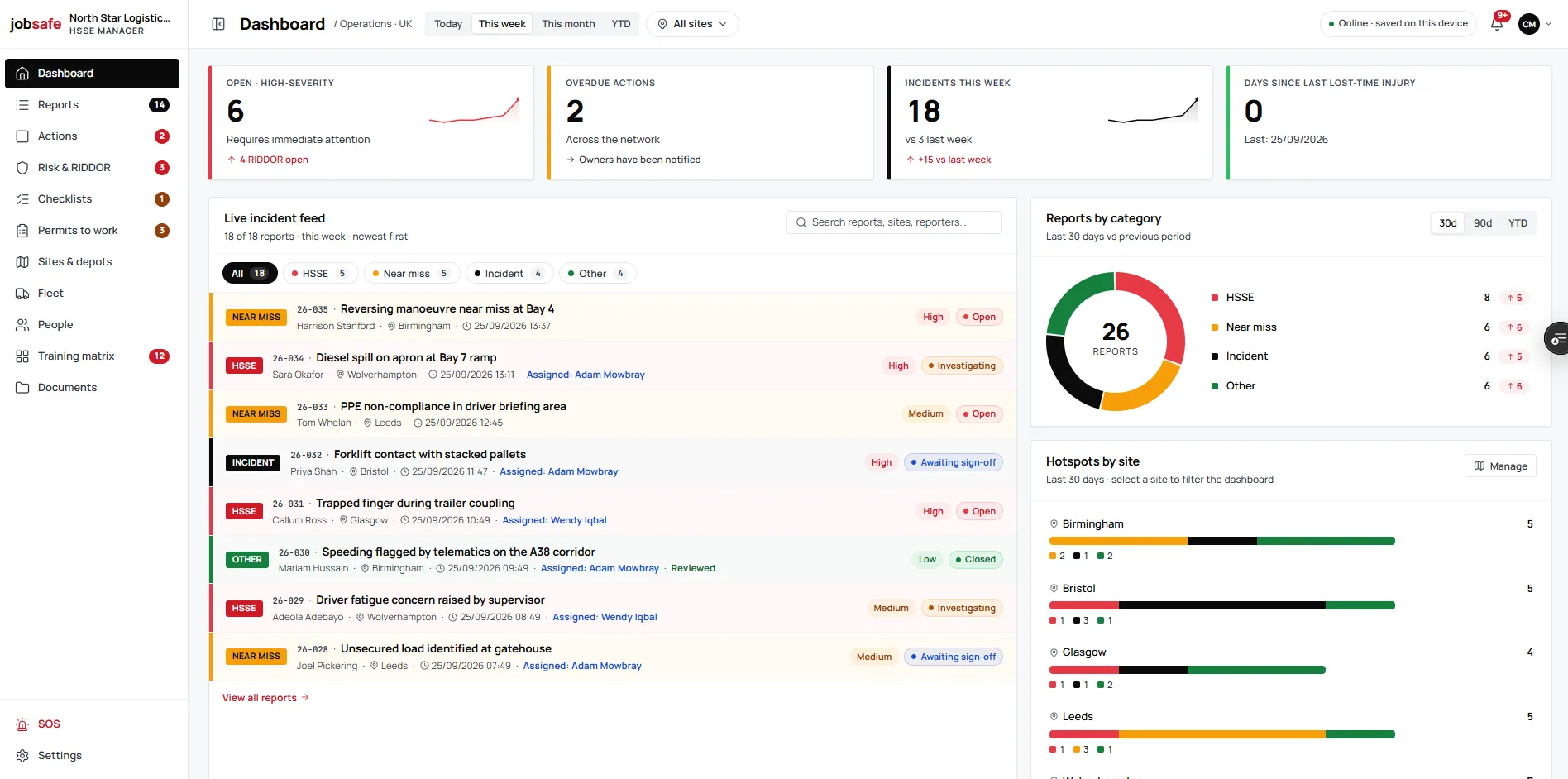
- Hosted in LondonUK region, each organisation walled off
- Works offlineEvery module saves to the phone first
- RIDDOR 2013 built inReg 4, Schedule 2 and the deadlines
- WCAG 2.2 AATested at 320px, gloves and glare
Record. Resolve. Prevent.
Three jobs, one record
Every module writes to the same record, so what a driver reports in the yard is what the investigator opens, what the action is raised from and what the next risk assessment reads.
Get it down while it is fresh: incidents, RIDDOR, checks and vehicles, from the phone in your pocket, with or without signal.
- Incident & near-miss reportingSeven steps from any phone, with photos, GPS, people, vehicles and RIDDOR triage.
- RIDDOR 2013A live verdict on what is reportable and by when, then a register of what you submitted.
- Checklists & inspectionsExpandingWalkarounds and inspections whose failures raise actions.
- Fleet & plantMOT, tax, insurance, service and LOLER dates on every vehicle and machine.
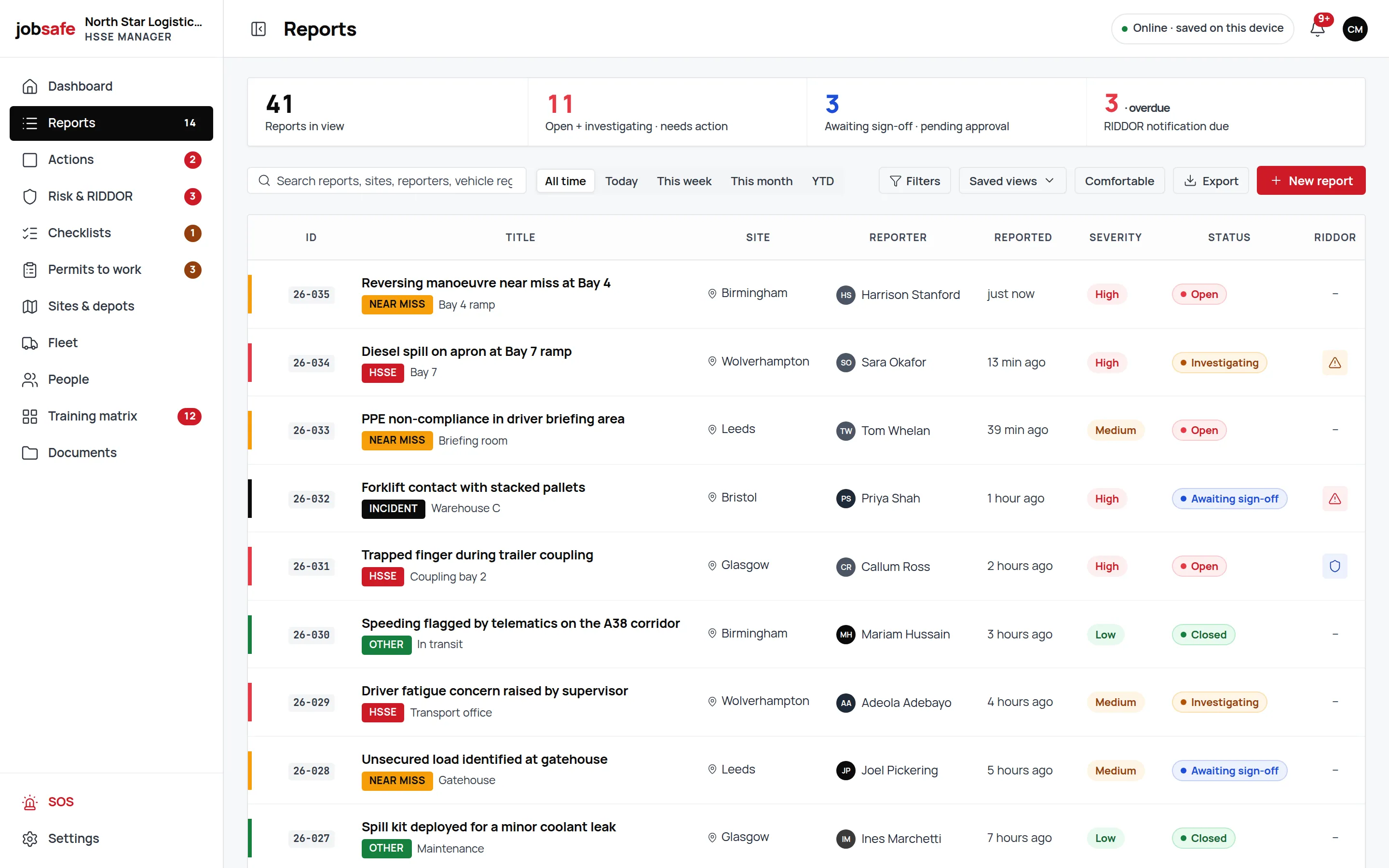
See the whole platform, what feeds what, and the two-minute tour.
One incident, end to end
From a tail lift in the yard to a closed training gap
One incident at a UK haulier, followed through the platform. Every screen is the product, on a real setup.
- Step 1
A driver reports a tail-lift injury in the yard with no signal.
Seven steps on the phone: what happened, where (GPS captured), who, the vehicle by registration, a photo of the tail lift, RIDDOR triage, review. The draft autosaves; the report shows "Pending sync" until the cab picks up signal.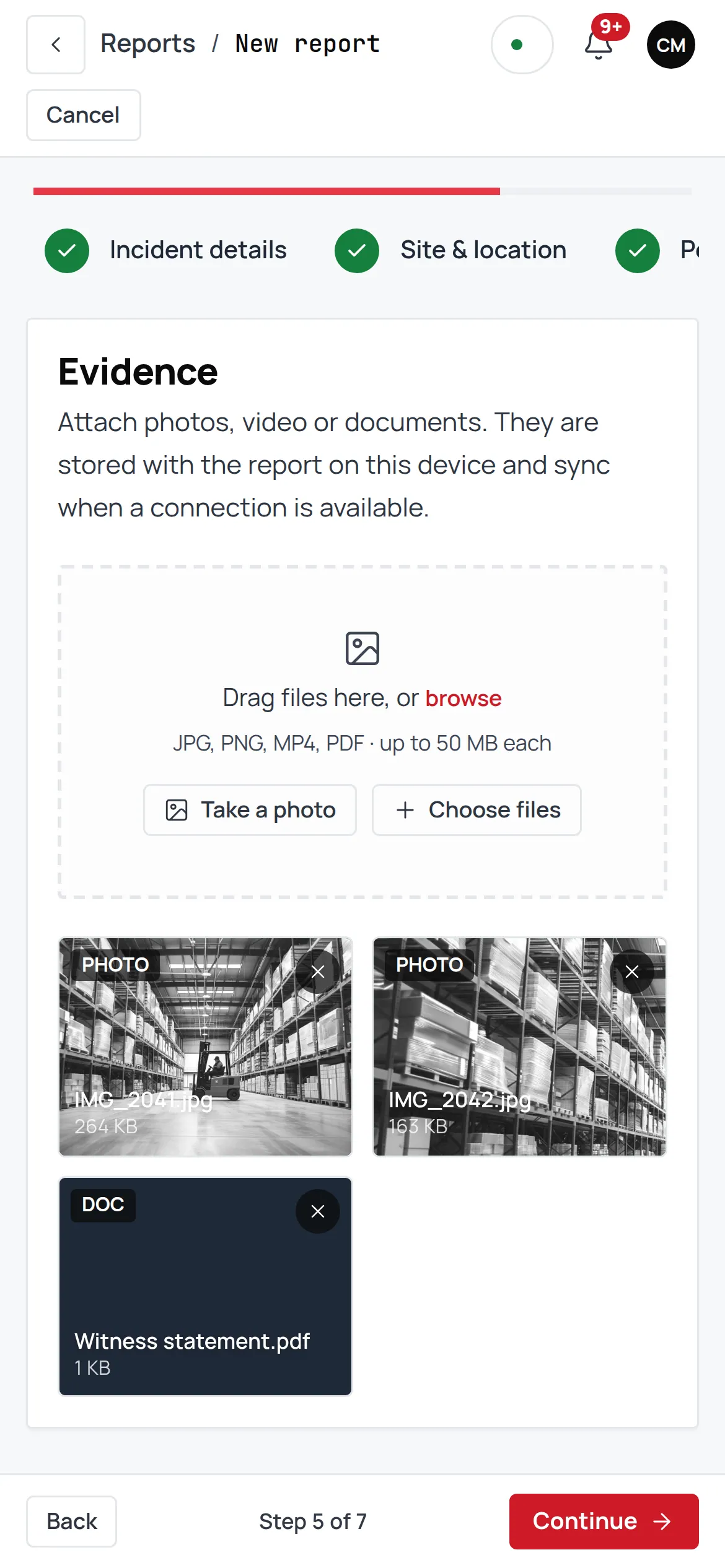
- Step 2
RIDDOR triage returns "Over-7-day incapacitation, report within 15 days".
The live verdict panel works the incident date against Reg 4 and the over-7-day rule, excluding the day of the accident and counting weekends, and puts the deadline on the register.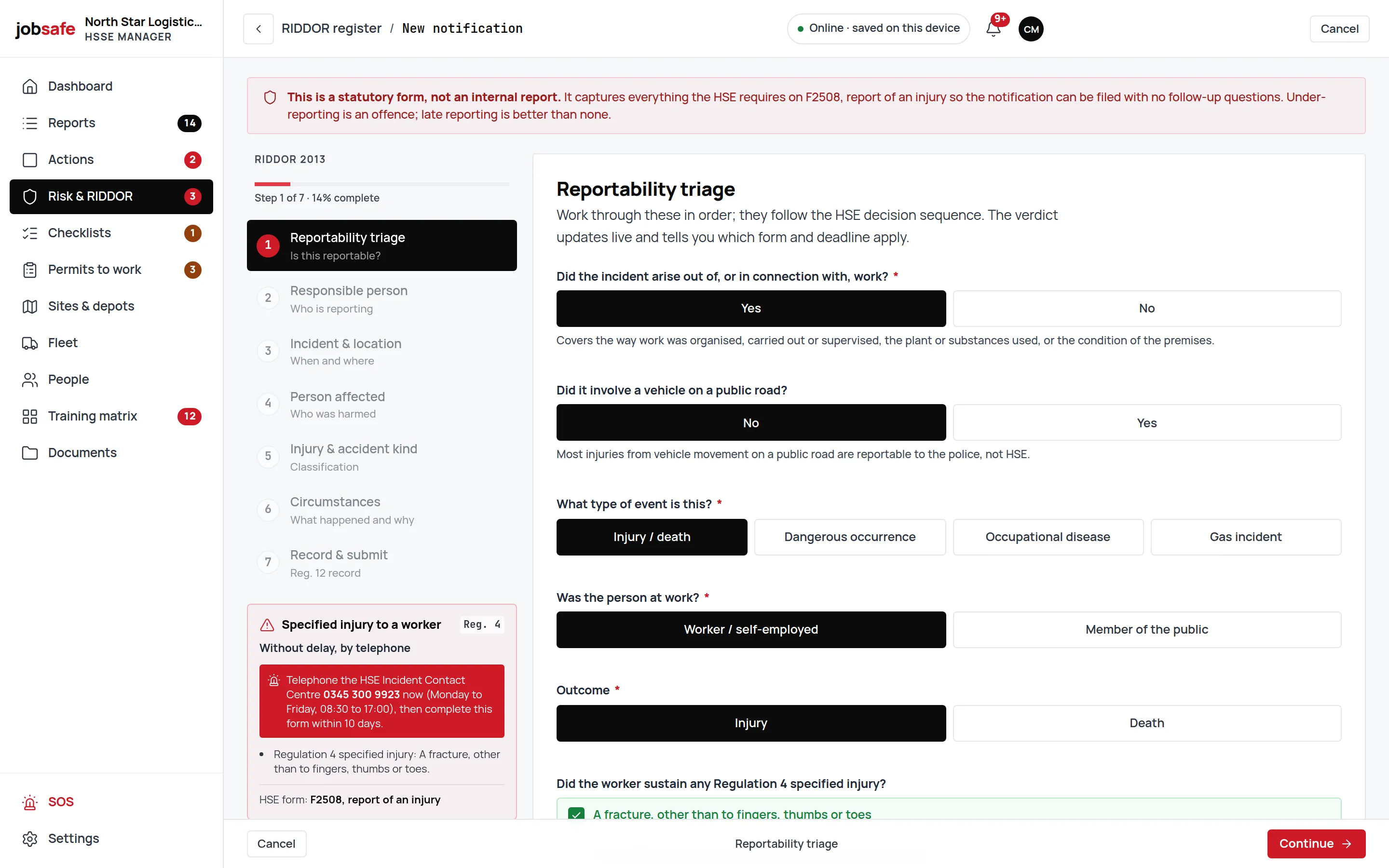
- Step 3
The investigator runs a four-level ICAM analysis.
On the report itself, beside the evidence gallery and the vehicle card: absent or failed defences, individual and team actions, task and environmental conditions, organisational factors.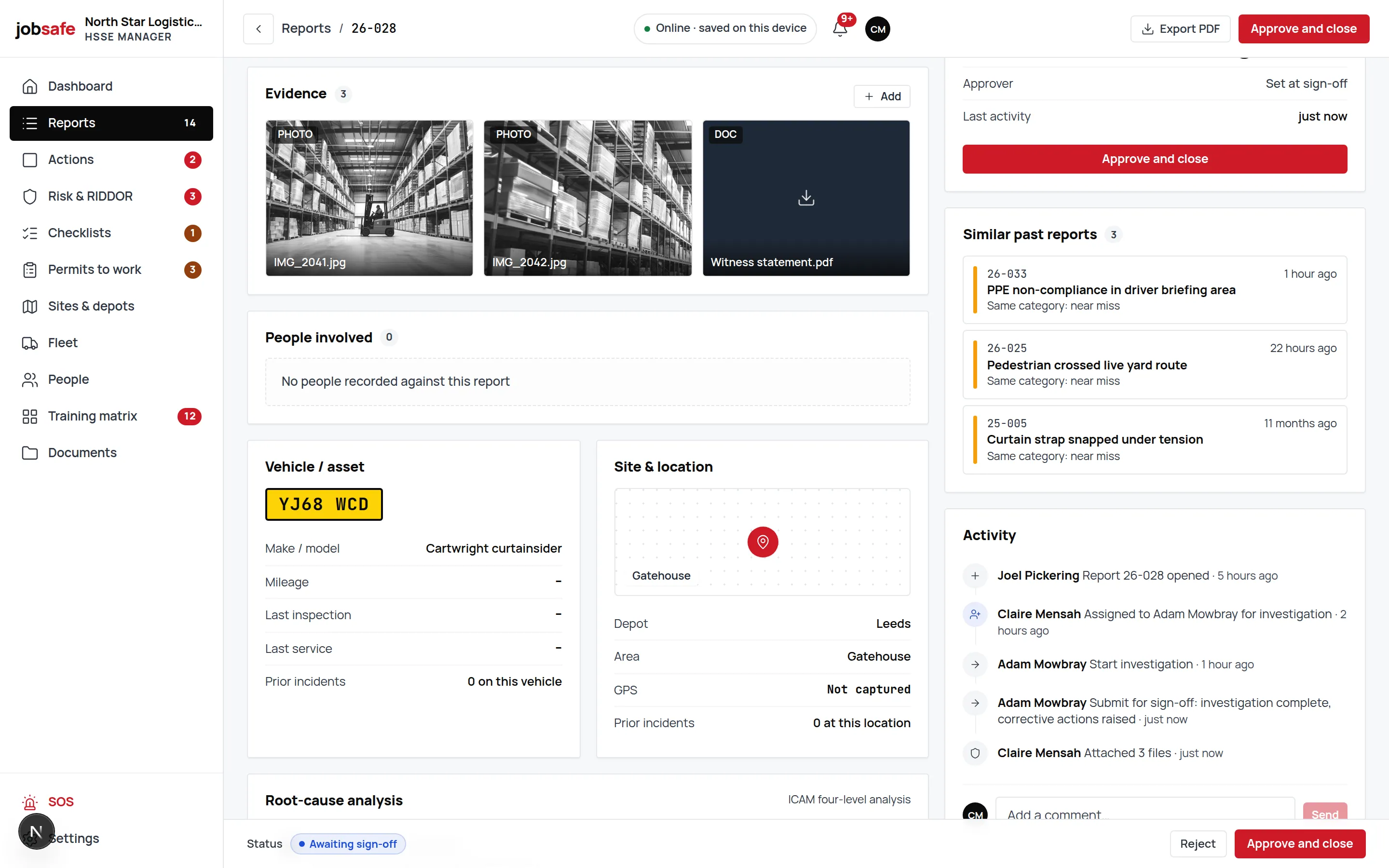
- Step 4
Corrective actions raise themselves.
Each finding becomes an action with an owner and a due date on the board, linked back to the report so the trail reads both ways.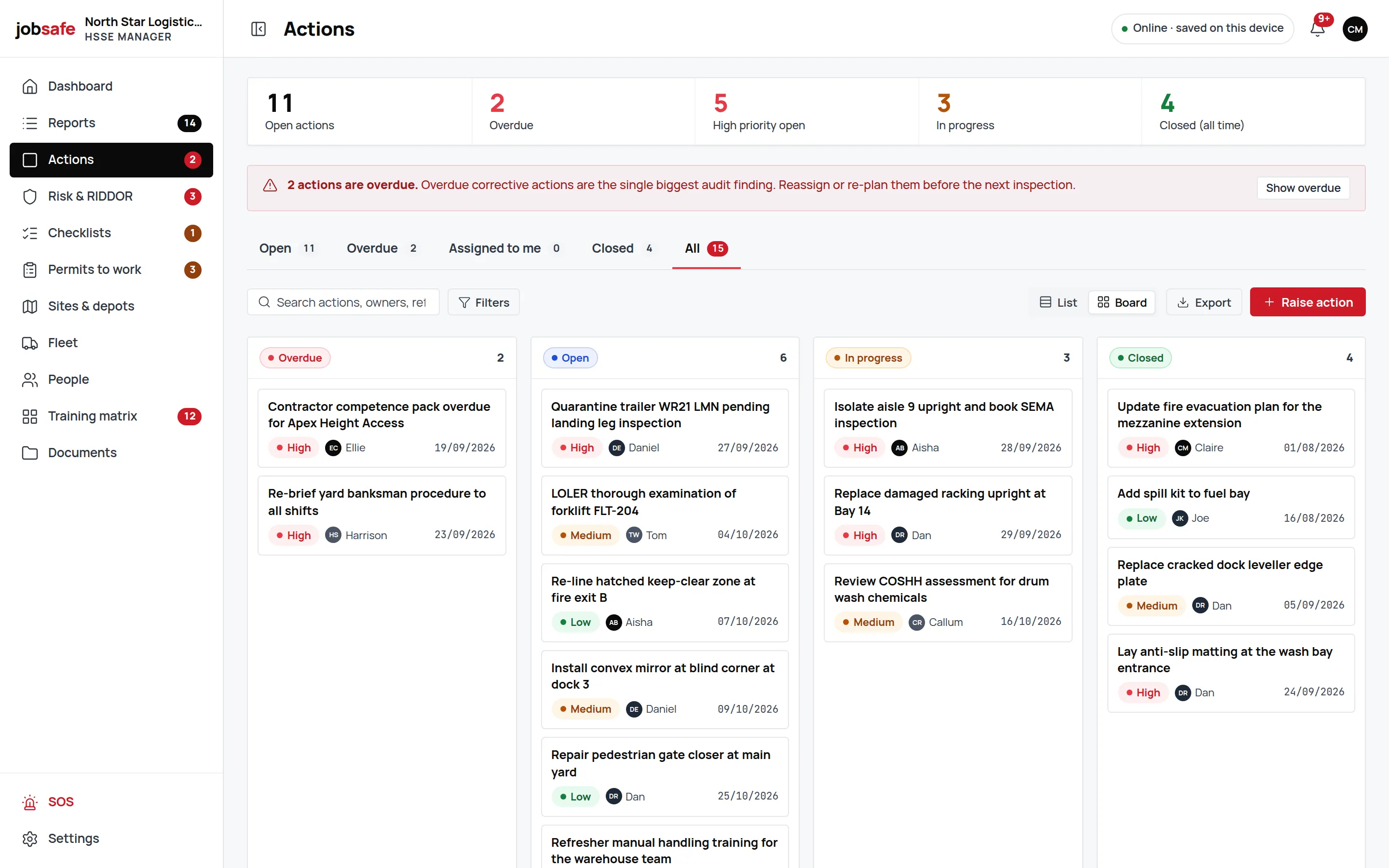
- Step 5
The manual-handling risk assessment is re-scored.
The worksheet is reopened, the tail-lift hazard re-scored on the 5×5 matrix, a further control added at the engineering level, and the assessment sent for approval.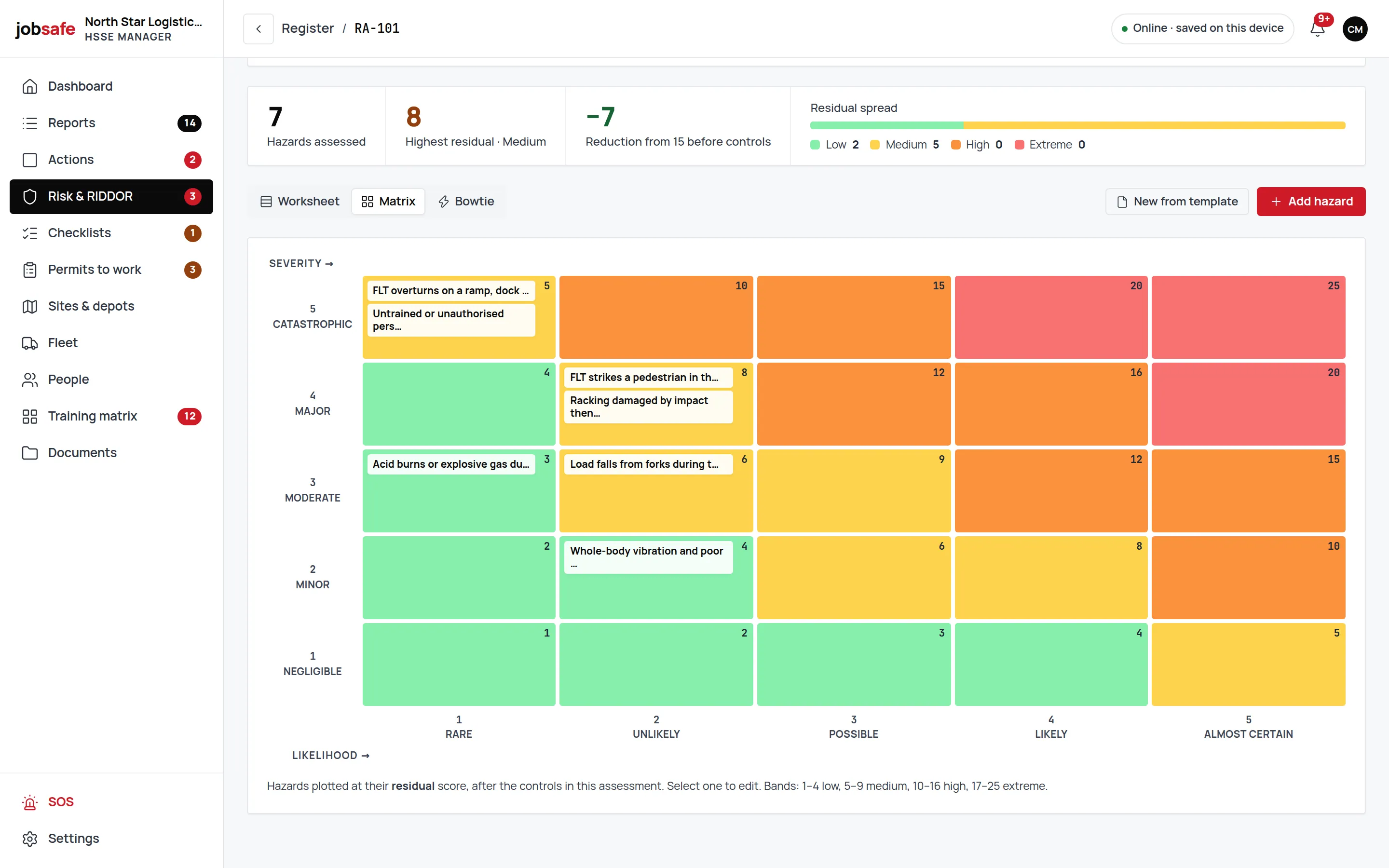
- Step 6
A training gap is flagged.
The competency matrix shows the driver’s tail-lift training is out of date. That becomes an action too.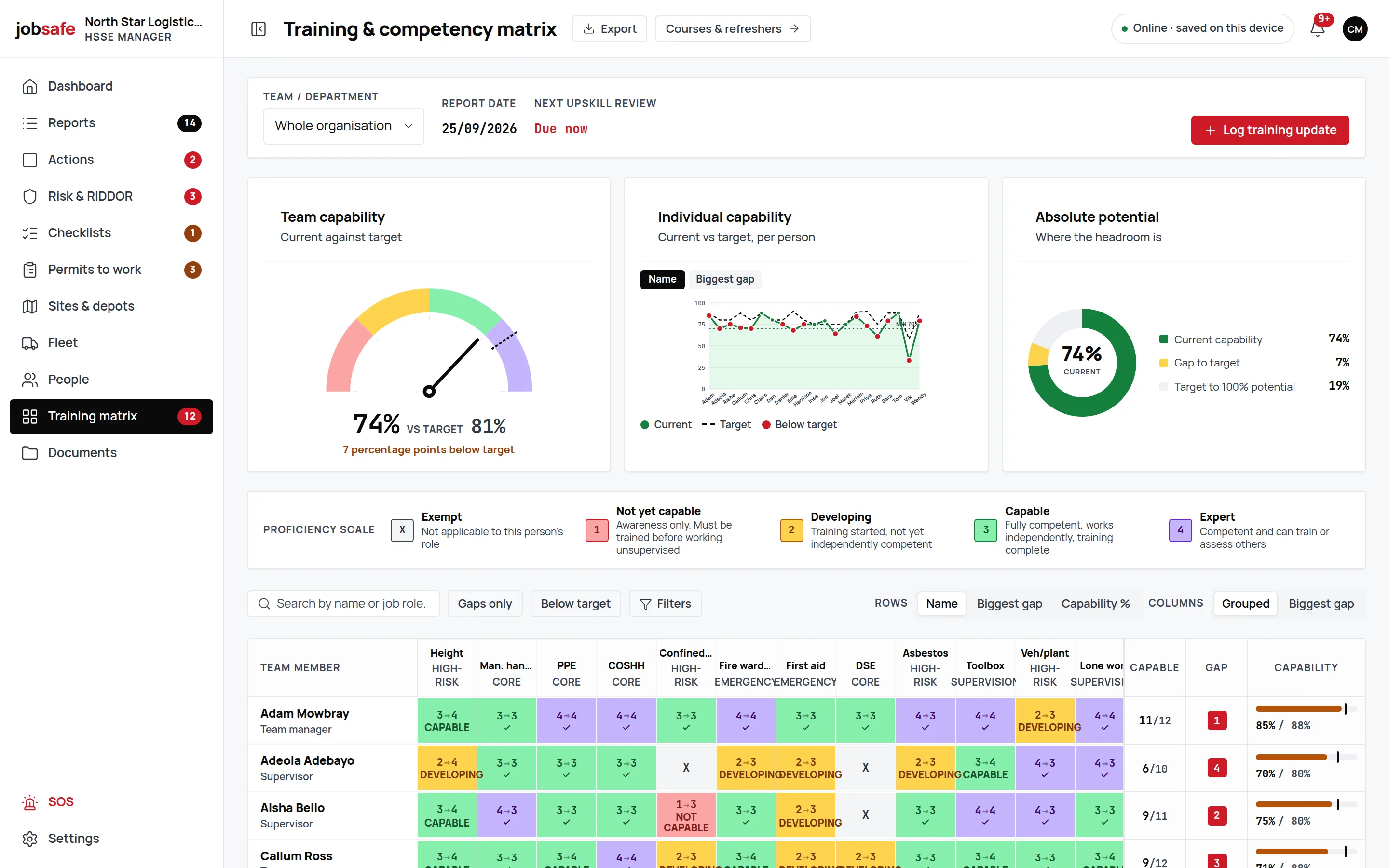
Built for UK law
Written for the regulations you are inspected against
Not a generic form with a UK flag on it. Each regulation below has a place in the product, and this is what that place does.
Reporting of Injuries, Diseases and Dangerous Occurrences Regulations 2013
RIDDOR 2013
Triage against the Reg 4 specified injuries, over-7-day incapacitation and the Schedule 2 dangerous occurrences, with the 10 and 15-day deadlines worked out from the incident date. You submit to HSE; jobsafe keeps the record and the reference.
Management of Health and Safety at Work Regulations 1999, regulation 3
MHSWR 1999 reg 3
A warning on any risk assessment that is not yet "suitable and sufficient", before it can go live.
Lifting Operations and Lifting Equipment Regulations 1998
LOLER 1998
LOLER examination dates kept on every vehicle and machine that lifts, beside MOT, tax, insurance and service.
Provision and Use of Work Equipment Regulations 1998
PUWER 1998
Service and inspection dates on the plant register, so the record shows equipment is maintained.
Control of Substances Hazardous to Health Regulations 2002
COSHH 2002
A COSHH risk assessment type with its own template, scored 5×5 and tagged by hierarchy of control.
Work at Height Regulations 2005
Work at Height Regs 2005
A work-at-height permit type with its required controls, and a roof-access risk assessment template.
Regulatory Reform (Fire Safety) Order 2005
Fire Safety Order 2005
A fire risk assessment type and template, with hot-works permits that check controls before issue.
Driver daily walkaround checks
DVSA daily walkaround
A walkaround checklist for drivers; a failed item raises an action against the vehicle.
Offline, proven live
Turn the signal off and file a report
Every module saves to the phone first. Try it here: no signal, a three-field report, then watch it sync when signal comes back.
On the phone
Nothing saved yet. Flip signal off and file one.
The real thing does this in every module. Nothing here leaves your browser.
The rules of what happens offline, how sync resolves, and how to install the app on a phone are on the offline page.
Industries
Written for the work you actually do
One platform, worded for each sector. Pick yours.

Transport & logistics
Yard, depot and cab. Walkarounds that raise defects, tail-lift and banksman incidents reported from the trailer, MOT and LOLER dates on every vehicle.
See the page
Window & door fitters
On site, up a ladder, with the van as the office. The near miss written down before the next job, and the evidence an insurer or a principal contractor will ask for.
See the page
Field services
Lone engineers on sites you do not control. A report from the customer’s car park with a photo and the location, and the risk assessment for the job in the same app.
See the page
Care & healthcare
Every shift, every incident, on the record. Staff safety on home visits and lone working, with the evidence a commissioner or an inspector expects to see.
See the page
Why teams switch
Five things the big suites make you live with
The differences that decide it, once the demo is over and the first invoice arrives.
| What matters | jobsafe | The big suites |
|---|---|---|
| Where your data lives | London. Each organisation walled off, private file storage. | A US or EU region, chosen for you. |
| How you pay | Quoted in pounds, VAT shown, per user per month. | A dollar price list, or a quote after a sales call. |
| When there is no signal | Every module saves to the phone first; "Pending sync" on the record. | An offline mode for some forms, not the whole product. |
| RIDDOR | Reg 4, Schedule 2 and the deadlines built in, with a register of what you submitted. | A generic incident form; you work out what is reportable. |
| Getting started | Live in days: invite people, pick templates, report. | An implementation project with its own invoice. |
Pricing
Three tiers. Prices in pounds, VAT shown.
The price list is being finalised. Book a demo and we will quote for your team on the call.
Essentials
Book a demo for pricing
- Incident and near-miss reporting
- Investigations
- Corrective actions
- RIDDOR
- Dashboard
- SOS
- Sites and people
- Offline app
Professional
Most teamsBook a demo for pricing
- Everything in Essentials
- Risk assessments and bowtie
- Permits and contractors
- Checklists
- Fleet and plant
- Training
- Documents
Enterprise
Talk to us
- Everything in Professional
- Onboarding
- Invoicing
- SLAs
FAQ
Frequently asked questions
Straight answers, including the ones that are not yet a yes.
Yes, in every module. A report, a risk assessment, a permit or a walkaround saves to the phone first and shows "Pending sync" until signal returns; then it syncs on its own. Signed-in phones open offline.
In the London region, hosted on Supabase over AWS eu-west-2. Each organisation is walled off by row-level security with its own private file storage, and you can export every register to CSV.
jobsafe is an installable web app: add it to the home screen on iPhone, Android or a desktop from the browser and it opens like an app, offline included. A native store app is not available yet.
No. It tells you whether an incident is reportable and by when, keeps the statutory record and the reference you get back, and reminds you of the deadline. You submit to HSE.
Pricing is per user per month, in pounds, with VAT shown separately on every figure. Book a demo for pricing and we will quote for your team size on the call.
Contractor is one of the six role levels, and the permit gate checks a contractor’s insurance, RAMS, accreditation and audit date before a permit issues. Adding new contractor records from inside the app is not available yet.
Not yet. Every register exports to CSV, so nothing you put in is locked in; import from spreadsheets is on the list but not built.
Book a 30-minute walkthrough. We show you the product on a UK haulier’s setup, answer your questions and, if it fits, agree a start date.
A good health and safety app records incidents, risk assessments, permits and checks on a phone, works without signal, keeps the data in your own jurisdiction and shows what is due. jobsafe does all four for UK operators; the big international suites cover the first.
EHS (environment, health and safety) software is one system for the records a business must keep about harm and risk at work: incidents, RIDDOR, risk assessments, permits, training and inspections. jobsafe is EHS software written for UK law and UK sites.
HSE software systems keep health, safety and environment records in one place so they can be found, acted on and shown to an inspector. In the UK the term also refers to the Health and Safety Executive; software like jobsafe helps you meet HSE’s reporting rules, but the HSE does not sell software.
See it running on your own sites.
30 minutes, on a real setup, with someone who knows the product.