
Record
Incident and near-miss reporting software
The report a driver can finish in the cab.
Incident reporting software that takes a report in seven steps from any phone, with photos, GPS, the people involved, the vehicle and RIDDOR triage, and works without signal. The register, the investigation and the actions live on the same record, hosted in the UK.
- Works offline
- Seven-step report
- Photo, video and PDF evidence
- RIDDOR triage built in
- CSV export
The problem, then the record
Three things that go wrong on paper
On paper
Near misses go unreported because the form lives in the office.
With jobsafe
A near miss is one of four report categories and the form is on every phone, offline included, so it gets written down where it happened.
On paper
By the time the investigator reads it, the photo is on someone else’s phone and the plate is wrong.
With jobsafe
Evidence is captured into the report from the camera, and the vehicle step takes the registration, model, mileage and last inspection at the time.
On paper
Nobody can say which reports are open, waiting for sign-off or heading for RIDDOR.
With jobsafe
Four saved views on the register answer that in one click, and every report carries a status gated by role.
Seven steps, and the draft saves itself
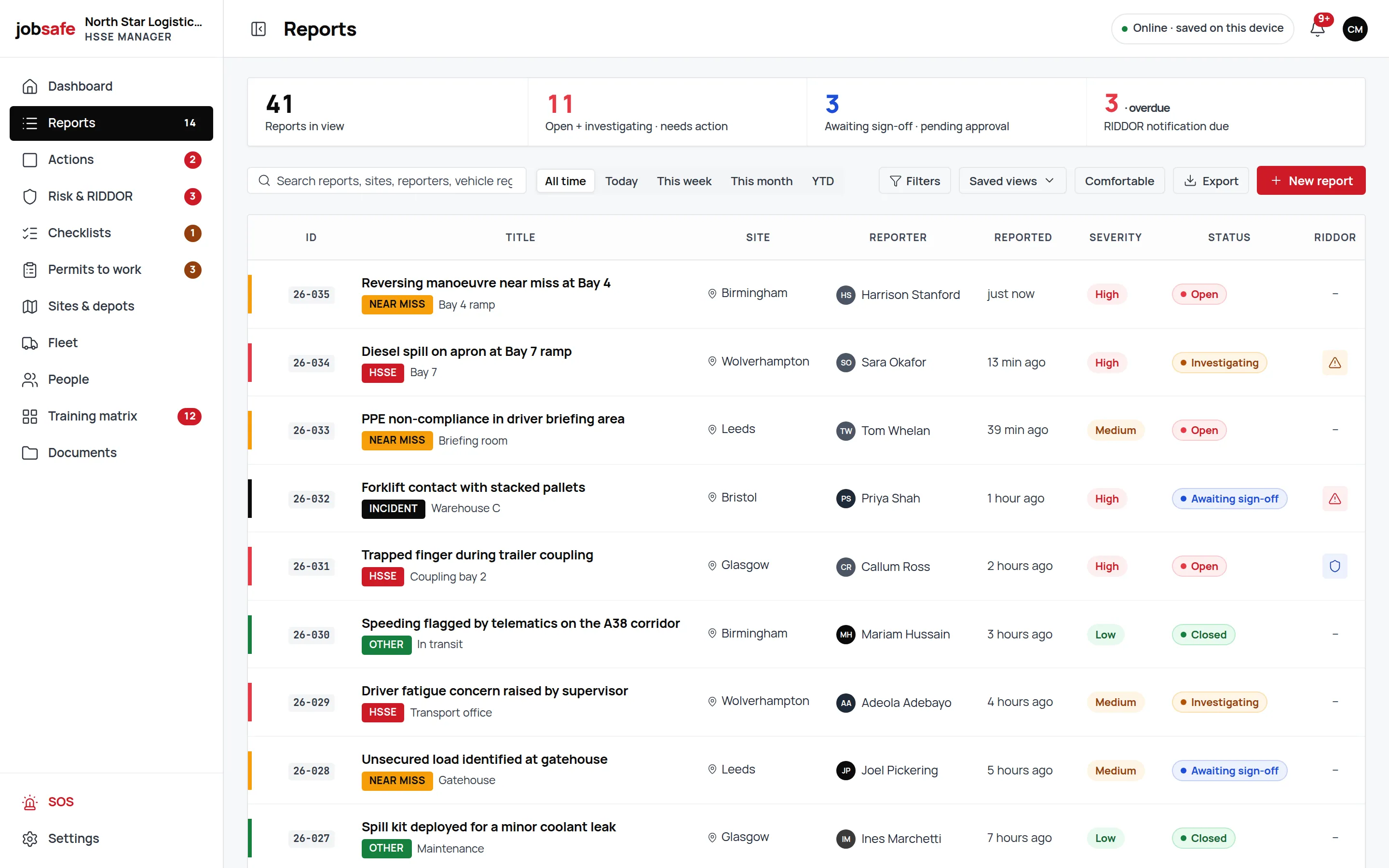
Details, site and location with GPS capture, people involved, vehicle or asset, evidence, RIDDOR triage, review. Each step is short enough for a phone in a yard; the draft autosaves on the device as you go.
- Site and location
- The site from your list, the spot from the phone’s GPS.
- People involved
- Injured, witness, first aider or involved, with the employee ID.
- Evidence from the camera
- Photo, video or PDF up to 50 MB each, straight from the phone.
A register that already knows what you want to see
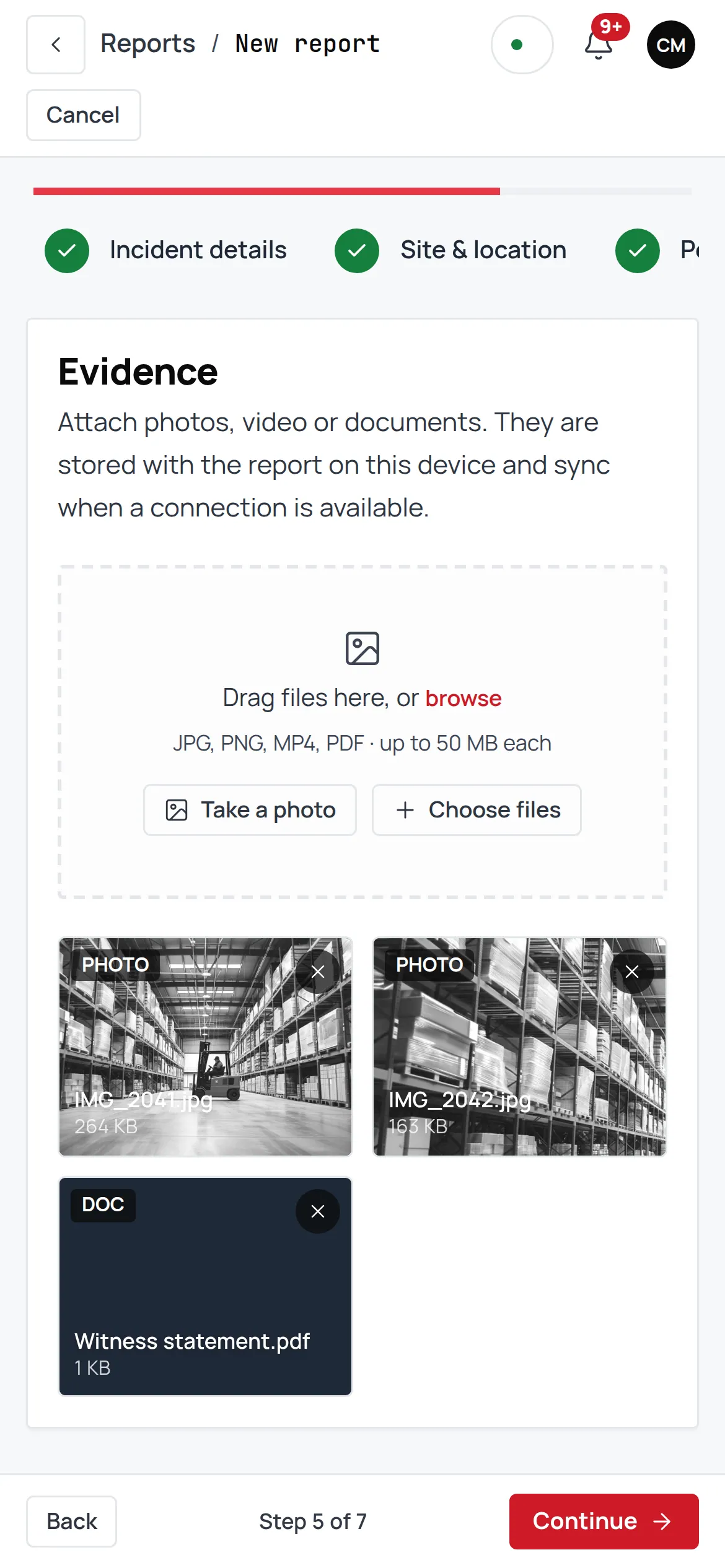
Search, a date range and filters, plus four saved views: “My open”, “Awaiting my sign-off”, “RIDDOR pending” and “This week’s high-severity”. Bulk assign, start an investigation, close, or export the lot to CSV.
- Four categories, three severities
- HSSE, near miss, incident or other; high, medium or low; numbered like 26-014.
- Bulk actions
- Assign, start an investigation or close several reports at once.
- CSV export
- Every register exports; nothing you record is locked in.
The detail page is the investigation
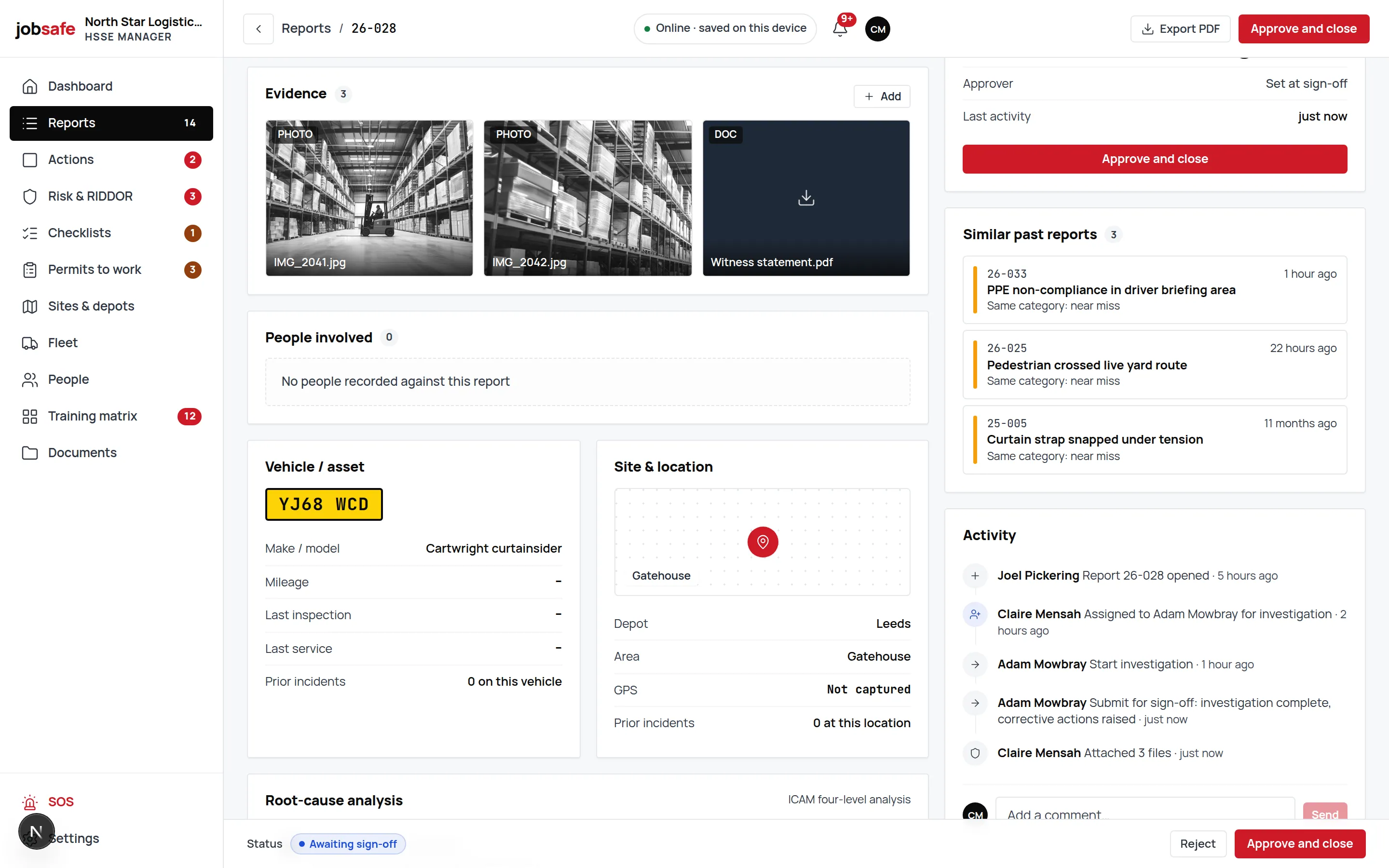
The evidence gallery, the people, the vehicle card with its UK number plate, a four-level ICAM root cause, the linked actions, similar past reports, a timeline and comments, all on the one record. Open → Investigating → Awaiting sign-off → Closed, each step gated by role.
- Four-level ICAM
- Absent or failed defences, individual and team actions, task and environmental conditions, organisational factors.
- Linked actions
- Actions raised from the findings sit on the report and on the board.
- Timeline and comments
- Who did what, when, with the discussion beside it.
Connected to
Where this record goes next
Every module writes to the same record, so what happens here shows up in these.
- RIDDOR 2013A live verdict on what is reportable and by when, then a register of what you submitted.
- InvestigationsFour-level ICAM root cause on the report itself, with the evidence beside it.Page coming in a later phase.
- Corrective actionsRaised from reports, hazards, checklists and permits, each with an owner and a date.Page coming in a later phase.
- Risk assessments & bowtie5×5 scoring, hierarchy of control, six types, bowtie barriers and approval.
UK regulation
What the law asks of an incident record
The Reporting of Injuries, Diseases and Dangerous Occurrences Regulations 2013 require certain incidents to be reported to HSE and records to be kept for three years. The Social Security (Claims and Payments) Regulations 1979 require an accident book (BI 510) where ten or more people are employed.
jobsafe keeps the record: what happened, where, to whom, the evidence and the investigation, with the RIDDOR triage on the report. It does not submit anything to HSE; the RIDDOR module tells you whether and by when, and you submit.
jobsafe holds no certification and claims none. The records are yours; so is the judgement in them.
FAQ
Frequently asked questions
Straight answers about incident & near-miss reporting in jobsafe.
One that is on the phone of the person who saw it, works without signal, captures the evidence at the time and puts the report in front of the person who has to act. A paper form or an office spreadsheet fails the first three. jobsafe’s seven-step report is built for exactly that, and the register and investigation are on the same record.
Yes. The draft autosaves on the phone and the report shows “Pending sync” until signal returns; then it syncs on its own.
Photos, video and PDFs, up to 50 MB each, straight from the phone’s camera or files. They stay on the report in an evidence gallery.
The lifecycle is Open → Investigating → Awaiting sign-off → Closed, and each step is gated by role level, so a report is signed off by someone allowed to sign it off.
Yes. The register exports to CSV with the filters you have applied. A report prints to PDF from the browser.
Near miss is one of the four categories, alongside HSSE, incident and other, with the same seven steps, so a near miss is as easy to record as an injury.
Read more
The guides behind this module
- Safety CultureNear Miss Reporting: The Cheapest Safety Win You're Probably IgnoringWhy near miss reporting matters, what the safety triangle really tells us, and how to build a reporting culture your field teams will actually use.
- Safety CultureHow to Investigate a Workplace Accident: Finding the Root Cause, Not the BlameA practical guide to accident investigation the HSE way: the four steps of HSG245, immediate vs underlying vs root causes, the 5 Whys, and how to prevent a repeat.
- Free toolkitThe site incident and near-miss reporting toolkitA seven-page PDF: the report template, the RIDDOR flowchart and near-miss triage.
See incident & near-miss reporting on your own setup.
A 30-minute walkthrough with someone who knows the product, on a UK haulier’s data.